本文最后更新于324 天前,其中的信息可能已经过时,如有错误请发送邮件到2067863254@qq.com
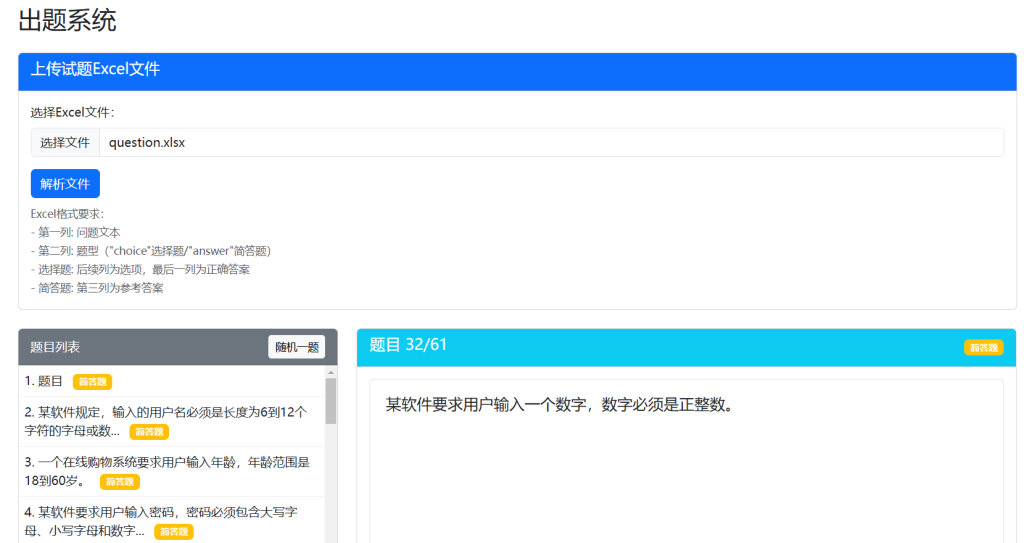
这是一个基于纯前端的出题系统,支持选择题和简答题两种题型。系统完全在浏览器中运行,无需服务器支持,所有数据处理都在本地完成。主要功能包括:
- 从Excel文件导入题目
- 支持选择题和简答题两种题型
- 题目浏览与答题功能
- 答案提交与保存
- 参考答案查看
- 导出带用户答案的Excel文件
<!DOCTYPE html>
<html lang="zh-CN">
<head>
<meta charset="UTF-8">
<meta name="viewport" content="width=device-width, initial-scale=1.0">
<title>出题系统</title>
<link href="https://cdn.jsdelivr.net/npm/bootstrap@5.3.0/dist/css/bootstrap.min.css" rel="stylesheet">
<script src="https://cdn.jsdelivr.net/npm/xlsx@0.18.5/dist/xlsx.full.min.js"></script>
<style>
.question-item {
cursor: pointer;
padding: 8px;
border-bottom: 1px solid #eee;
}
.question-item:hover {
background-color: #f8f9fa;
}
.question-item.active {
background-color: #e9ecef;
}
#question-container {
min-height: 300px;
border: 1px solid #dee2e6;
border-radius: 5px;
padding: 20px;
}
.hidden {
display: none;
}
.question-type-badge {
font-size: 0.75rem;
margin-left: 8px;
}
#answer-textarea {
min-height: 100px;
}
.option-label {
display: block;
margin-bottom: 5px;
}
/* 导航按钮样式 */
#prevBtn, #nextBtn {
min-width: 80px;
}
</style>
</head>
<body>
<div class="container mt-4">
<h2 class="mb-4">出题系统</h2>
<!-- 文件上传区域 -->
<div class="card mb-4">
<div class="card-header bg-primary text-white">
<h5>上传试题Excel文件</h5>
</div>
<div class="card-body">
<div class="mb-3">
<label for="excelFile" class="form-label">选择Excel文件:</label>
<input class="form-control" type="file" id="excelFile" accept=".xlsx, .xls">
</div>
<button id="parseBtn" class="btn btn-primary">解析文件</button>
<div class="mt-2">
<small class="text-muted">
Excel格式要求:<br>
- 第一列: 问题文本<br>
- 第二列: 题型("choice"选择题/"answer"简答题)<br>
- 选择题: 后续列为选项,最后一列为正确答案<br>
- 简答题: 第三列为参考答案
</small>
</div>
</div>
</div>
<div class="row">
<!-- 题目列表 -->
<div class="col-md-4">
<div class="card">
<div class="card-header bg-secondary text-white">
<div class="d-flex justify-content-between align-items-center">
<span>题目列表</span>
<button id="randomBtn" class="btn btn-sm btn-light">随机一题</button>
</div>
</div>
<div class="card-body p-0">
<div id="questions-list" style="max-height: 500px; overflow-y: auto;"></div>
</div>
</div>
</div>
<!-- 题目展示与答题区域 -->
<div class="col-md-8">
<div class="card">
<div class="card-header bg-info text-white d-flex justify-content-between align-items-center">
<h5 id="current-question-title">题目</h5>
<span id="question-type-badge" class="badge bg-light text-dark question-type-badge"></span>
</div>
<div class="card-body">
<div id="question-container" class="mb-3">
<p class="text-muted">请从左侧选择题目或上传Excel文件</p>
</div>
<!-- 选择题答题区域 -->
<div id="choice-answer-section" class="hidden">
<h6>请选择答案:</h6>
<div id="choice-options" class="mb-3"></div>
</div>
<!-- 简答题答题区域 -->
<div id="text-answer-section" class="hidden">
<h6>请输入你的答案:</h6>
<textarea id="answer-textarea" class="form-control mb-3"></textarea>
</div>
<div>
<button id="prevBtn" class="btn btn-outline-secondary me-2">上一题</button>
<button id="nextBtn" class="btn btn-outline-secondary">下一题</button>
</div>
<div>
<button id="showAnswerBtn" class="btn btn-outline-success me-2">查看答案</button>
<button id="submitBtn" class="btn btn-primary">提交答案</button>
</div>
<!-- 用户答案显示 -->
<div id="user-answer-display" class="mt-3 p-3 bg-light rounded hidden">
<h6>你的答案:</h6>
<div id="user-answer-content"></div>
</div>
<!-- 正确答案显示 -->
<div id="correct-answer" class="alert alert-success mt-3 hidden">
<h6>参考答案:</h6>
<div id="correct-answer-content"></div>
</div>
</div>
</div>
</div>
</div>
<!-- 下载按钮 -->
<div class="mt-3 text-end hidden" id="download-section">
<button id="downloadBtn" class="btn btn-success">下载带答案的Excel</button>
</div>
</div>
<script>
// 全局变量
let questions = [];
let currentQuestionIndex = -1;
let userAnswers = {};
let workbook = null;
let worksheet = null;
// DOM元素
const prevBtn = document.getElementById('prevBtn');
const nextBtn = document.getElementById('nextBtn');
const questionsList = document.getElementById('questions-list');
const questionContainer = document.getElementById('question-container');
const choiceAnswerSection = document.getElementById('choice-answer-section');
const textAnswerSection = document.getElementById('text-answer-section');
const choiceOptionsDiv = document.getElementById('choice-options');
const answerTextarea = document.getElementById('answer-textarea');
const correctAnswerDiv = document.getElementById('correct-answer');
const correctAnswerContent = document.getElementById('correct-answer-content');
const currentQuestionTitle = document.getElementById('current-question-title');
const questionTypeBadge = document.getElementById('question-type-badge');
const userAnswerDisplay = document.getElementById('user-answer-display');
const userAnswerContent = document.getElementById('user-answer-content');
const parseBtn = document.getElementById('parseBtn');
const randomBtn = document.getElementById('randomBtn');
const showAnswerBtn = document.getElementById('showAnswerBtn');
const submitBtn = document.getElementById('submitBtn');
const downloadBtn = document.getElementById('downloadBtn');
const downloadSection = document.getElementById('download-section');
const excelFileInput = document.getElementById('excelFile');
// 事件监听
prevBtn.addEventListener('click', showPreviousQuestion);
nextBtn.addEventListener('click', showNextQuestion);
parseBtn.addEventListener('click', parseExcelFile);
randomBtn.addEventListener('click', showRandomQuestion);
showAnswerBtn.addEventListener('click', showCorrectAnswer);
submitBtn.addEventListener('click', submitAnswer);
downloadBtn.addEventListener('click', downloadExcelWithAnswers);
// 显示上一题
function showPreviousQuestion() {
if (currentQuestionIndex <= 0) {
alert('已经是第一题了');
return;
}
showQuestion(currentQuestionIndex - 1);
}
// 显示下一题
function showNextQuestion() {
if (currentQuestionIndex >= questions.length - 1) {
alert('已经是最后一题了');
return;
}
showQuestion(currentQuestionIndex + 1);
}
// 解析Excel文件
function parseExcelFile() {
const file = excelFileInput.files[0];
if (!file) {
alert('请先选择Excel文件');
return;
}
const reader = new FileReader();
reader.onload = function(e) {
const data = new Uint8Array(e.target.result);
workbook = XLSX.read(data, { type: 'array' });
// 获取第一个工作表
const firstSheetName = workbook.SheetNames[0];
worksheet = workbook.Sheets[firstSheetName];
// 转换为JSON
const jsonData = XLSX.utils.sheet_to_json(worksheet, { header: 1 });
// 处理数据
questions = jsonData.filter(row => row.length >= 3).map((row, index) => {
const question = {
id: index,
text: row[0],
type: row[1] || 'answer', // 默认为简答题
userAnswer: null,
isAnswered: false
};
if (question.type === 'choice') {
// 选择题
question.options = row.slice(2, -1);
question.answer = row[row.length - 1];
} else {
// 简答题
question.answer = row[2];
}
return question;
});
if (questions.length === 0) {
alert('Excel文件中没有找到有效的题目数据');
return;
}
// 初始化用户答案
userAnswers = {};
// 渲染题目列表
renderQuestionsList();
// 显示第一个题目
if (questions.length > 0) {
showQuestion(0);
}
// 显示下载按钮
downloadSection.classList.remove('hidden');
alert(`成功解析 ${questions.length} 道题目(${questions.filter(q => q.type === 'choice').length}道选择题,${questions.filter(q => q.type === 'answer').length}道简答题)`);
};
reader.readAsArrayBuffer(file);
}
// 渲染题目列表
function renderQuestionsList() {
questionsList.innerHTML = '';
questions.forEach((question, index) => {
const questionItem = document.createElement('div');
questionItem.className = 'question-item';
// 题目文本(截短显示)
const shortText = question.text.length > 30
? question.text.substring(0, 30) + '...'
: question.text;
questionItem.innerHTML = `
${index + 1}. ${shortText}
<span class="badge ${question.type === 'choice' ? 'bg-info' : 'bg-warning'} question-type-badge">
${question.type === 'choice' ? '选择题' : '简答题'}
</span>
`;
questionItem.dataset.index = index;
// 标记已回答的题目
if (question.isAnswered) {
questionItem.style.fontWeight = 'bold';
questionItem.style.color = '#28a745';
}
questionItem.addEventListener('click', () => {
showQuestion(index);
});
questionsList.appendChild(questionItem);
});
}
// 显示指定题目
function showQuestion(index) {
// 更新导航按钮状态
prevBtn.disabled = index <= 0;
nextBtn.disabled = index >= questions.length - 1;
// 更新当前题目索引
currentQuestionIndex = index;
// 更新列表中的活动项
const allItems = document.querySelectorAll('.question-item');
allItems.forEach(item => {
item.classList.remove('active');
if (parseInt(item.dataset.index) === index) {
item.classList.add('active');
}
});
// 获取当前题目
const question = questions[index];
currentQuestionTitle.textContent = `题目 ${index + 1}/${questions.length}`;
// 更新题型标识
questionTypeBadge.textContent = question.type === 'choice' ? '选择题' : '简答题';
questionTypeBadge.className = `badge ${question.type === 'choice' ? 'bg-info' : 'bg-warning'} question-type-badge`;
// 渲染题目
questionContainer.innerHTML = `<h5>${question.text}</h5>`;
// 根据题型显示不同的答题区域
if (question.type === 'choice') {
// 选择题
choiceAnswerSection.classList.remove('hidden');
textAnswerSection.classList.add('hidden');
// 渲染选项
let optionsHtml = '';
question.options.forEach((option, i) => {
optionsHtml += `
<div class="form-check">
<input class="form-check-input" type="radio" name="answer" id="option-${i}" value="${option}">
<label class="form-check-label option-label" for="option-${i}">
${String.fromCharCode(65 + i)}. ${option}
</label>
</div>
`;
});
choiceOptionsDiv.innerHTML = optionsHtml;
// 恢复已选择的答案
if (question.userAnswer !== null) {
const options = choiceOptionsDiv.querySelectorAll('input[type="radio"]');
options.forEach(option => {
if (option.value === question.userAnswer) {
option.checked = true;
}
});
}
} else {
// 简答题
choiceAnswerSection.classList.add('hidden');
textAnswerSection.classList.remove('hidden');
// 恢复已输入的答案
answerTextarea.value = question.userAnswer || '';
}
// 显示用户答案
updateUserAnswerDisplay();
// 隐藏参考答案
correctAnswerDiv.classList.add('hidden');
}
// 更新用户答案显示
function updateUserAnswerDisplay() {
const question = questions[currentQuestionIndex];
if (question.userAnswer !== null) {
userAnswerDisplay.classList.remove('hidden');
userAnswerContent.innerHTML = question.type === 'choice'
? `<strong>选项:</strong> ${question.userAnswer}`
: question.userAnswer;
} else {
userAnswerDisplay.classList.add('hidden');
}
}
// 显示随机题目
function showRandomQuestion() {
if (questions.length === 0) return;
let randomIndex;
do {
randomIndex = Math.floor(Math.random() * questions.length);
} while (randomIndex === currentQuestionIndex && questions.length > 1);
showQuestion(randomIndex);
}
// 显示正确答案
function showCorrectAnswer() {
if (currentQuestionIndex === -1) return;
const question = questions[currentQuestionIndex];
if (question.type === 'choice') {
correctAnswerContent.innerHTML = `
<strong>正确答案:</strong> ${question.answer}<br>
${question.options.includes(question.answer)
? `(${String.fromCharCode(65 + question.options.indexOf(question.answer))})`
: ''}
`;
} else {
correctAnswerContent.innerHTML = question.answer;
}
correctAnswerDiv.classList.remove('hidden');
}
// 提交答案
function submitAnswer() {
if (currentQuestionIndex === -1) return;
const question = questions[currentQuestionIndex];
let answer = null;
if (question.type === 'choice') {
// 选择题
const selectedOption = choiceOptionsDiv.querySelector('input[name="answer"]:checked');
if (!selectedOption) {
alert('请先选择一个答案');
return;
}
answer = selectedOption.value;
} else {
// 简答题
answer = answerTextarea.value.trim();
if (!answer) {
alert('请输入你的答案');
return;
}
}
// 保存用户答案
question.userAnswer = answer;
question.isAnswered = true;
userAnswers[currentQuestionIndex] = answer;
// 更新显示
updateUserAnswerDisplay();
// 更新题目列表显示
renderQuestionsList();
alert('答案已保存');
}
// 下载带答案的Excel
function downloadExcelWithAnswers() {
if (!workbook || !worksheet) {
alert('请先上传并解析Excel文件');
return;
}
// 获取原始数据
const jsonData = XLSX.utils.sheet_to_json(worksheet, { header: 1 });
// 添加用户答案列
const newData = jsonData.map((row, index) => {
if (index >= questions.length || row.length === 0) return row;
// 创建新行(避免修改原行)
const newRow = [...row];
// 确保有足够的列
while (newRow.length < 3) newRow.push('');
// 添加用户答案列
if (questions[index].isAnswered) {
// 如果已经有用户答案列(第4列),更新它
if (newRow.length > 3) {
newRow[3] = questions[index].userAnswer || '';
} else {
// 否则添加用户答案列
newRow.push(questions[index].userAnswer || '');
}
} else if (newRow.length <= 3) {
// 没有答案但需要保持列数一致
newRow.push('');
} else {
newRow[3] = '';
}
return newRow;
});
// 更新工作表
const newWorksheet = XLSX.utils.aoa_to_sheet(newData);
workbook.Sheets[workbook.SheetNames[0]] = newWorksheet;
// 生成Excel文件
const excelBuffer = XLSX.write(workbook, { bookType: 'xlsx', type: 'array' });
// 创建下载链接
const blob = new Blob([excelBuffer], { type: 'application/octet-stream' });
const url = URL.createObjectURL(blob);
const a = document.createElement('a');
a.href = url;
a.download = '带答案的试题.xlsx';
document.body.appendChild(a);
a.click();
document.body.removeChild(a);
URL.revokeObjectURL(url);
}
</script>
</body>
</html>